Choose what to track.
Create an item for an activity you want to record. Its history starts empty unless you choose to add a first entry.
 Again Soon
Coming soon
Again Soon
Coming soon
Habit tracking & days since
Again Soon helps you record activities, see how long it has been since your last entry, and understand patterns in the history you choose to keep.
Choose what you want to do more often, less often, or stop doing. You can also maintain a rhythm or simply keep a record, without choosing a goal.
Explore the appAgain Soon is coming to the App Store for iPhone.
A public download is not available yet.
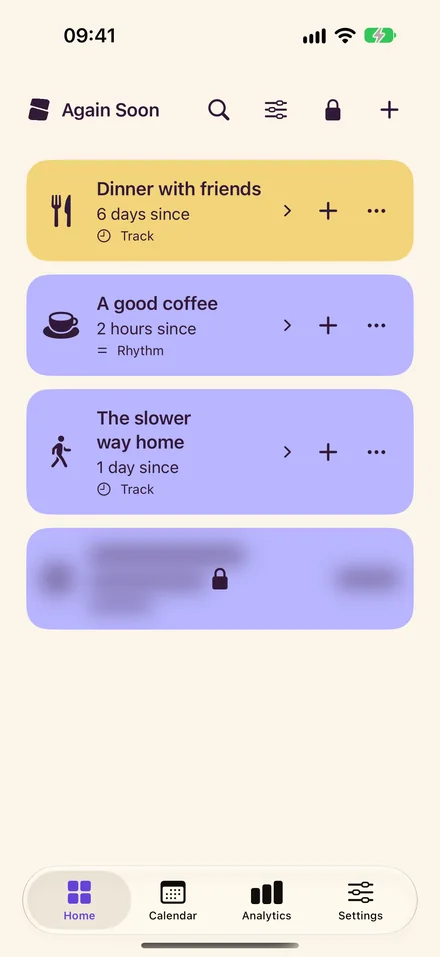
Track everyday habits or occasional activities, from reading to meeting friends. Give each item a name, color, or selected photo, then keep its entries together in one history.
Create an item for an activity you want to record. Its history starts empty unless you choose to add a first entry.
Each deliberate logging tap adds one dated entry, including repeats on the same day. Add a note or photo, backdate an entry, or correct it in history.
See the time since your last entry, browse your calendar, and compare how often you recorded an activity with the gaps between its entries.
Your calendar and charts describe your recorded history. Entry counts and active dates are shown separately, so repeated entries on one day are clear. An empty day means nothing was logged, rather than proving an activity did not happen.
These are actual app screens with fictional records. You choose the activities and details in your own collection.
Choose a list, grid, or card view. Each item shows the time since its last entry, with your chosen colors and photos.
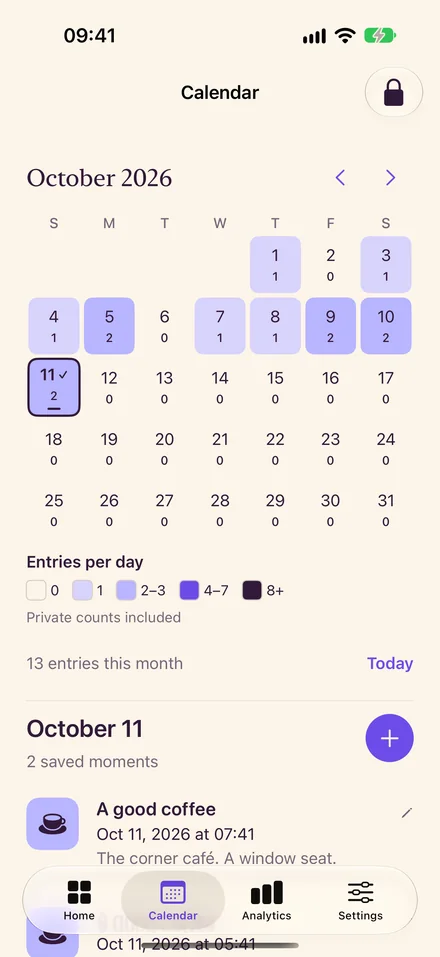
Browse the calendar heatmap and open a day to read its entries. Add an earlier entry when you forgot to record something.
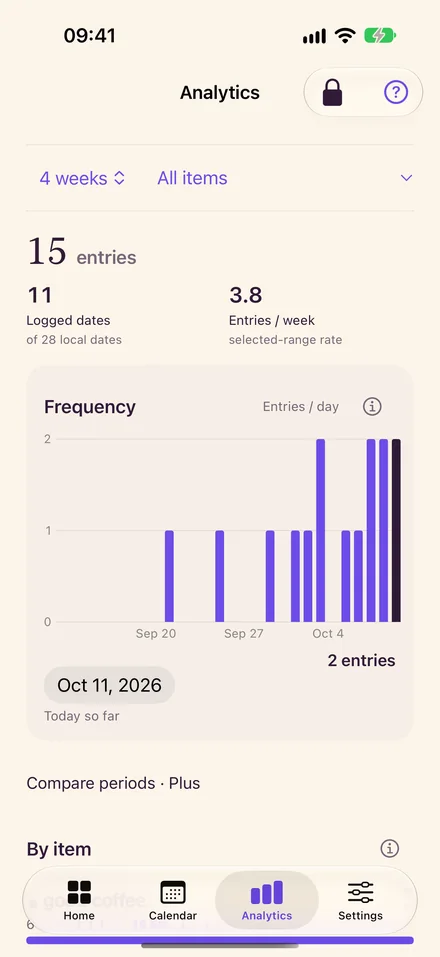
Free includes basic charts, timing heatmaps, and time between entries. Plus adds longer analytics ranges and comparisons between periods.
The same entry can mean different things for different habits.
Choose Do more, Maintain a rhythm, Do less, or Stop to give an item a direction. Just track keeps a history without a target. You can change your goal while keeping your records.
Progress is shown in relation to your chosen goal. Logging a Do less or Stop activity does not count as a success simply because you added an entry, and a missed target is described without blame.
Ordinary logging saves to your device. Again Soon has no separate account, advertising SDK, or developer analytics SDK. Optional iCloud sync starts off.
Private-item controls hide identifying details until device authentication. Their dates and summary counts remain visible while locked.
Read the privacy policyYou decide which permissions to allow.
Select photos through Apple’s picker and choose whether to enable location or notification features. Reminders ask you to review an activity; they never log it automatically.
You can export a backup.
Free includes export and restore. Private items are excluded unless you explicitly include them after authentication. Exported files are readable, so store and share them carefully.
Enabling iCloud transfers your complete library, including private items, photos, and saved places, to your private iCloud database. Turning it off keeps existing cloud records. The privacy policy explains these limits.
Free includes five active items and their full history. Plus supports a larger collection and deeper views of your records.
$0
Track five active items with a full editable history for each one.
Archive an item to make room for another. Its history stays available.
$0.99 / month
or $9.99 / year, billed annually
Track unlimited active items and explore your history in more detail.
Existing records, logging, editing, and export remain available if Plus ends.
These are US reference prices. Apple shows your local price and billing terms before purchase. Subscriptions renew automatically unless canceled in Apple account settings. Public purchase will be available with the App Store release.
Places, notifications, and iCloud require separate choices and permissions. Notification delivery depends on iOS and your settings. iCloud requires Plus and transfers the complete library described in the privacy policy.
Read plan and subscription termsAgain Soon is coming to the App Store for iPhone.
Explore the support guide to learn how logging, goals, and backups work.